User guide
How to run a debate analysis
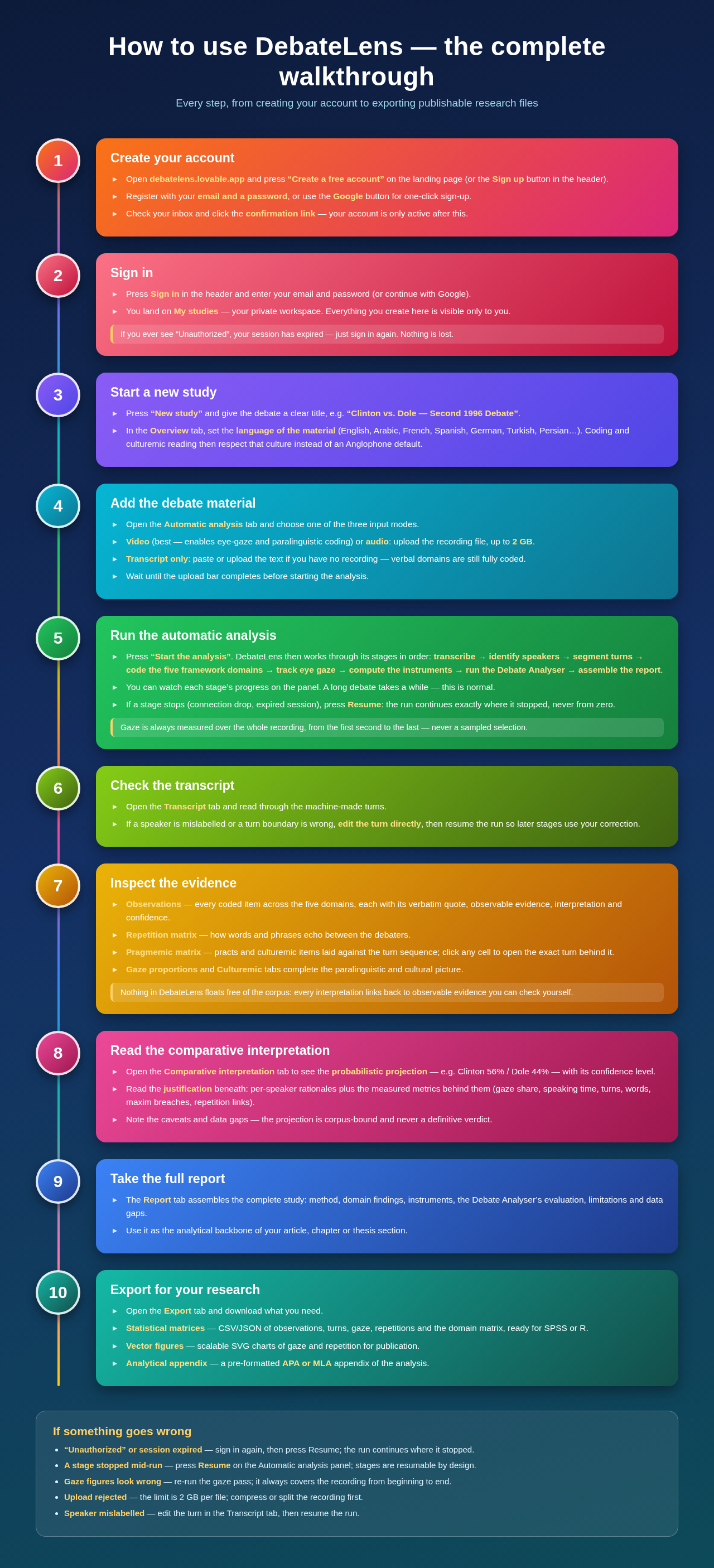
DebateLens takes a televised debate and applies the framework to it automatically. You supply the recording; it returns a draft transcript, coded observations across five domains, gaze and repetition measurements, and — once those records are reviewed — a comparative interpretation of the corpus. The comparative interpretation reports which participant's discourse is denser in the framework evidence counted for this corpus. It is not a statement of who won the debate, a ranking of candidates, or a prediction of an election. This page walks through the whole path, from account to report.
- 1
Create your account
Choose Sign up in the top bar. Enter your name, email, and a password of at least eight characters, or continue with Google.
- If email confirmation is required, open the link sent to your inbox before signing in.
- Everything you create — studies, recordings, transcripts, observations — is private to your account.
- 2
Start a study
Go to Studies and create one study per debate. Give it the debate title, the date, and the broadcaster if you know them.
- A study is the container for one debate: its recording, its transcript, its coded observations, and its report.
- Add the participants (for example, the two candidates and the moderator) so turns can be attributed correctly.
- Set the language of the material in the Overview tab before you run the analysis. The coding then reads the debate within its own rhetorical tradition — honorifics, forms of address, register and dialect shifts, culturally specific idiom — and keeps every quotation in the original language.
- 3
Add the material
Open the Automatic analysis tab and supply whatever you have: a video file, an audio file, or an existing transcript.
- Video gives the fullest analysis, because eye-gaze and speech state can only be read from the picture.
- Audio alone still yields transcript, turns, and all verbal domains.
- A transcript alone yields the verbal domains without paralinguistics.
- Uploads go to private storage; only you can open them.
- 4
Run the analysis
Press Start analysis. DebateLens works through the stages in order and shows progress as it goes.
- Transcription and speaker separation, then turn-by-turn segmentation.
- Coding across the five framework domains: cohesion and coherence, pragmatics, paralinguistics, ideology and bipartisanship, culturemic and pragmemic.
- Instruments: the repetition matrix, Gricean maxim breaches, lexical fields.
- Eye-gaze and speech state read across the whole recording, first second to last.
- The run is resumable. If it stops, press Resume and it continues from the last completed stage rather than starting again.
- 5
Inspect the evidence
Use the workspace tabs to check the material behind every figure before you rely on it.
- Transcript — the turns as segmented, editable if a speaker label needs correcting.
- Observations — each coded record with its observable evidence kept separate from its interpretation.
- Repetition — the matrix computed from the links between turns.
- Lexical trio — the LCT panel: reference and transitional signals, repetition links, and academic lexical phrases per participant, plus the Hoey ranking that flags the debate's central utterances and a full turn-by-turn link matrix.
- Gaze — time-based q-gaze and a-gaze totals per speaker, with denominators and coverage shown.
- Pragmemic matrix — every pragmatic act laid out against the turn sequence, so you can see how illocutionary force shifts across the debate; click any cell to reach the verbatim evidence behind it.
- 6
Test the reading before you publish it
Three tabs exist so a reviewer's objections can be answered with figures rather than assurances.
- Reliability — draws a reproducible slice of the corpus with a seeded shuffle and lets you re-code it blind, then reports Cohen's kappa between the two readings for domain and category.
- Coverage — how much of the recording carries evidence, which turns carry none, which domains are sparse, and exactly what was excluded and why.
- Sensitivity — the same comparative reading recomputed under different settings (bond cut-off 2 to 5, qualified records in or out, gaze in or out), so you can see whether the leading participant survives a change of assumptions.
- Validation — a cross-study page comparing each study's reading with the independently documented result of that debate, with its source and date.
- 7
Read the comparative interpretation
The comparative interpretation reports which participant's discourse is denser in the framework evidence counted for this corpus. It is not a statement of who won the debate, a ranking of candidates, or a prediction of an election.
- The tab shows the figure with its confidence, its coverage, and the reasoning that produced it.
- The panel lists the evidence behind the figure, the confidence level, the caveats, and any gaps in the data.
- A narrow margin is flagged as narrow. Treat it as such.
- 8
Take away the report
The Report tab assembles the whole study: framework findings, instruments, gaze proportions, and the projection, each anchored to the transcript.
- The Export tab produces the material you need for publication: comma-separated matrices for SPSS or R, the full dataset as a structured file, scalable vector figures of the gaze and repetition matrices, and a pre-formatted analytical appendix in APA or MLA style.
- Every export is built from counted records only, so an exported table matches the figures shown on screen.
How long does it take?
A full-length debate of roughly ninety minutes takes a while to work through, because the recording is read in sequence rather than sampled. You can leave the tab and come back; the run keeps its place and the progress bar tells you which stage it has reached.
If something goes wrong
- The page is blank or asks me to sign in again.
- Your session has expired. Sign in again at the auth page and reopen the study; a run in progress can be resumed.
- The analysis stopped part-way.
- Press Resume in the Automatic analysis tab. Completed stages are kept, so only the remaining work is done.
- The gaze figures look wrong.
- Use Re-run gaze pass. It clears the previous gaze readings and reads the recording again end to end, then recomputes the projection. Verbal coding is untouched.
- My upload is rejected.
- Files up to 2 GB are accepted. For longer broadcasts, upload the audio track instead, or supply a transcript.
- A speaker is labelled incorrectly.
- Edit the turn in the Transcript tab. Everything computed from turns is recalculated from the corrected labels.
What to keep in mind
Every figure in DebateLens is traceable to something observable in the recording, and observable evidence is always held apart from interpretation. Machine-drafted material stays a draft, outside every computed figure, until you accept or qualify it. The comparative interpretation reports which participant's discourse is denser in the framework evidence counted for this corpus. It is not a statement of who won the debate, a ranking of candidates, or a prediction of an election.